Hvis du har problemer med at logge ind på din konto, bedes du følge nedenstående trin.
1. Sørg for, at du har indtastet din e-mail og adgangskode korrekt.
2. Hvis du stadig ikke kan login, nulstil din adgangskode ved hjælp af linket “Mistet din adgangskode?” på login-siden.
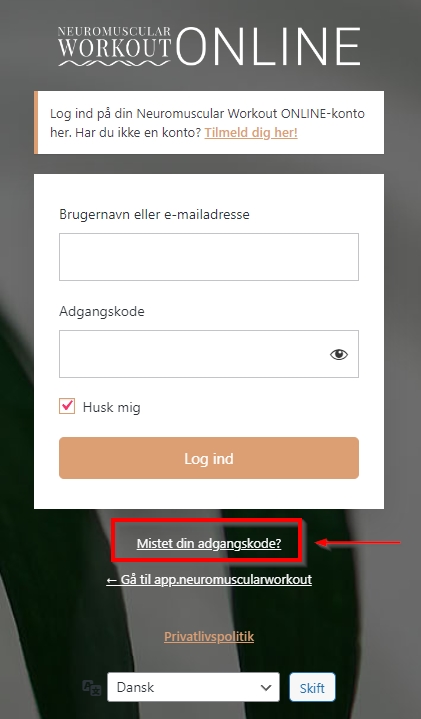
Hvis du ikke modtager en e-mail med instruktioner om nulstilling af din adgangskode inden for et par minutter, skal du tjekke dit e-mailprograms spam-mappe.
3. Hvis trin 1 og 2 ikke virkede, åbn en support ticket med vores webadministrator via dette link:
Vi anbefaler følgende udstyr for at gøre det nemt for dig at følge med i videoer og livestreams:
- En redondo ball: https://www.procare.dk/redondo-bold-fra-togu/
- Elastik: https://www.procare.dk/da/theraband-latexfri-elastik-25m/
- Gummiring: https://www.procare.dk/da/traeningselastikk/
- Håndvægte: https://www.billig-fitness.dk/collections/haandvaegte/
- Træningmåtte: https://www.billig-fitness.dk/products/fitnessmatte-sort-fra-nordic-strength/
Hvis du er et nyt ONLINE-medlem, og det er første gang, du modtager dit daglig video-session e-mail, bedes du tjekke din e-mail-spam-mappe.
Hvis du finder e-mailen der, skal du sørge for at markere e-mailen som ‘Ikke spam’ og tilføje e-mailafsenderen til dine kontakter i dit e-mailprogram for at reducere antallet af lignende problemer i fremtiden.
Hvis du ikke kan finde din eksklusive e-mail i din spam-mappe, kan det skyldes, at du ved et uheld har afmeldt dig vores e-mail-liste. I så fald bedes du åbne en supportbillet hos vores webadministrator, som vil hjælpe dig så hurtigt som muligt:
I mellemtiden, hvis du allerede er ONLINE-medlem, kan du frit vælge en video-session at følge fra vores omfattende video bibliotek .
Trin 1: Vælg dit Neuromuscular tema
Det første skridt på din Neuromuscular Workout rejse bør være at vælge temaen for din træning.
De tre temaer, du kan vælge mellem, er:
- Neuromuscular genopretning og forebyggelse af skader
- Neuromuscular støtte til løb og sport
- Neuromuscular rygsøjle og kropsholdning
For at vælge temaen kan du få adgang til listen over temaer fra sitets startside eller ved at klikke eller trykke på de 3 menulinjer øverst til højre og vælge dit fokus
Trin 2: Vælge din træningsform
Inden for hvert tema kan du så vælge, hvilken type øvelse du ønsker at lave.
Øverst på temasiden ser du de komplette video-sessioner. Det er længere videoer, og de omfatter mange af de enkelte øvelser inden for det pågældende tema.
Herunder kan du se alle de enkelte videoer, hvor du kan vælge at fokusere kortere tid på en bestemt øvelse.
Hvis du vil vælge en hel video-session eller en enkelt øvelse, skal du blot trykke eller klikke på den valgte video.
Trin 3: Følg vejledningen i videoen
Sørg for at følge videovejledningen så nøje som muligt for at sikre, at du får mest muligt ud af øvelserne og sessioner.

Trin 1: Log ind på din konto
Besøg loginsiden og log ind med dine loginoplysninger til din konto.
Trin 2: Besøg din kontoside
Naviger til din kontoside her:
Trin 3: Opsige dit abonnement
Klik enten på “Annuller” ved siden af navnet på dit abonnement eller på “Opsig dit abonnement”.
Trin 1:
Åbn din foretrukne webbrowser på din enhed.
Trin 2:
Naviger til appen Neuromuscular Workout på følgende websted:
Trin 3:
Åbn indstillingerne i din webbrowser. Du kan normalt finde disse indstillinger i øverste eller nederste hjørne under 3 prikker.
Trin 4:
Klik på “Tilføj til startskærm” (eller din browsers version af dette).
Trin 5:
Naviger til din enheds startskærm, og tryk på det nye ikon for Neuromuscular Workout og hold det nede for at redigere navnet eller placeringen på din enhed.
For teknisk hjælp eller for at rapportere et problem bedes du kontakte teknisk support her:
For andre forespørgsler, herunder pre-sales spørgsmål, information om Neuromuscular Workout-programmet eller presseforespørgsler, brug venligst vores kontaktformular her:

If you are having an issue with logging in to your account, please take the following steps.
1. Ensure that you have entered your email and password correctly.
2. If you still cannot login, reset your password using “mistet din adgangskode?” the link on the login page:
If you do not recieve an email with instructions on reseting your password within a few minutes, please check your email spam folder.
3. If step 1 and 2 did not work, open a support ticket with our web administrator via this link:
We recommend the following equipment to make following the videos and live streams easy for you.
- A redondo ball: https://www.procare.dk/redondo-bold-fra-togu/
- A training elastic: https://www.procare.dk/da/theraband-latexfri-elastik-25m/
- A circular training elastic: https://www.procare.dk/da/traeningselastikk/
- Hand weights: https://www.billig-fitness.dk/collections/haandvaegte/
- A training mat: https://www.billig-fitness.dk/products/fitnessmatte-sort-fra-nordic-strength/
If you are a new ONLINE-member and this is the first time you may be recieving your daily video session email, please check the spam folder in your chosen email program.
If you find the email there, please be sure to mark the email as ‘Not Spam’ and add the email sender to your contacts in your email program to reduce the incidents of similar issues in the future.
If you cannot find your the email in your spam folder, it may be due to you accidently unsubscribing from our email list. In this case, please open a support ticket with our web administrator who will help you as soon as possible.
In the meantime, if you are already a Neuromuscular Workout ONLINE member, and are logged into your account, you can freely chose a video to follow from our extensive video library.
Step 1: Choose your neuromuscular theme
The first step in your Neuromuscular Workout journey should be to choose the theme of your session or exercise.
The three themes to choose from are:
- Neuromuscular Recovery and Injury Prevention
- Neuromuscular Running and Sports Support
- Neuromuscular Spine and Posture
To choose your theme, you can access the list of the themes from the app’s homepage or by clicking or tapping on the 3 menu bars at the top right and selecting your theme.
Step 2: Choose the type of session
In each theme, you can then choose which type of exercise you would like to do.
At the top of the theme page you will see full video sessions. These are longer videos, and encompass many of the singular exercises within that theme.
Below that, you can see all of the singular individual videos, where you can choose to focus a shorter amount of time on a particular exercise.
To choose a full video session, or a singular exercise, simply tap or click on your chosen video.
Trin 3: Follow the video guidance
Take care to follow the video instructions as closely as possible to ensure that you get the most out of the exercises and sessions as possible.
Step 1: Log into your account
Visit the login page and log in using your account login details.
Step 2: Visit your Membership account page
Navigate to the page here:
Step 3: Cancel Your Subscription
Click on cancel your subscription at the top of the page, and then click either ‘Annuller’ beside the name of your subscription, or ‘Opsig dit abonnement’
Step 1:
On your device, open your preferred web browser.
Step 2:
Navigate to the Neuromuscular Workout app site at:
Step 3:
Open your web browsers settings. This can usually be found in the top or bottom corner, under 3 dots.
Step 4:
Click on “Add to Home Screen” (or your browsers version of such).
Step 5:
Navigate to your devices home screen and tap and hold the new Neuromuscular Workout icon to edit the name or placement on your device.
For technical help, or to report an issue please contact tech support here:
For other inquiries, including pre-sales questions, information about the Neuromuscular Workout program or press enquiries, please use our contact form here: